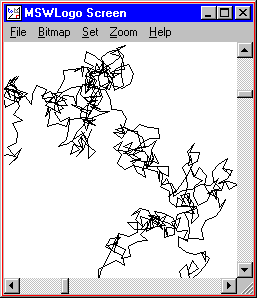
REPEAT 1000 [ FORWARD 10 RIGHT RANDOM 360 ] |
|
The first few lessons taught us how to write programs that draw pictures. So far, all of our programs draw the same picture every time. In this lesson, we are going to add randomness to our programs so that they draw different pictures every time they are run.
Logo give you two ways to add randomness. The first is with random numbers. The second is by picking an element at random from a list.
Let's take a look and random numbers.
| Command | Example | What Happens |
|---|---|---|
| RANDOM number | RANDOM 10 | Returns a random number from 0 to 9. |
The "RANDOM" command returns a random number from 0 to the number given, minus 1. Wherever you can put a regular number, you can put a "RANDOM" instruction. So, instead of "FORWARD 100", you can write "FORWARD RANDOM 100".
REPEAT 1000 [ FORWARD 10 RIGHT RANDOM 360 ] |
|
We can use the RANDOM command to create random numbers in other ranges. For example, "(RANDOM 10) + 10" returns a random number from 10 - 19. Likewise, "(RANDOM 10) * 10" returns a random multiple of 10 from 0 - 90 (a number in the set {0, 10, 20, 30, 40, 50, 60, 70, 80, 90}).
How would you create a random number from -5 to 5? What about a random even number from 0 - 30?
Random numbers are great, but let's say you already have some values in mind and you just want Logo to pick one at random. In this case, you use the "PICK" command.
| Command | Example | What Happens |
|---|---|---|
| PICK list | PICK [1 4 9 16 25] | Returns either 1, 4, 9, 16, or 25 at random. |
| RUN instruction | RUN PICK [[FORWARD 100] [BACK 100]] | Goes either forward or backward at random. |
Notice how "PICK" and "RUN" can be combined to execute a command at random.
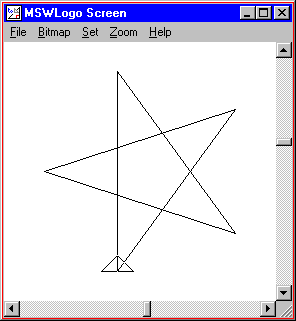
Activity: Let's write a program that draws a star with either 5, 7, or 11 points. Run the program a few times to see it draw different stars.
TO STAR :POINTS
  REPEAT :POINTS [
    FORWARD 100
    RIGHT 180 - (180 / :POINTS)
  ]
END

TO RANDOMSTAR
  STAR PICK [ 5 7 11 ]
END

RANDOMSTAR
|
|
Activity: Experiment with RANDOM and PICK to create your own interesting pictures. You can start with any program from the other lessons and replace a number with a RANDOM instruction.
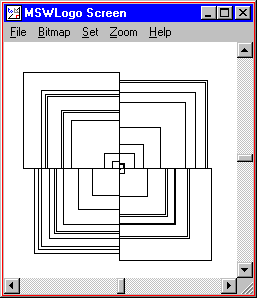
TO SQUARE :SIZE REPEAT 4 [ FORWARD :SIZE RIGHT 90 ] END TO RANDOMBOXES REPEAT 10 [ SQUARE RANDOM 100 ] END TO BOXPICTURE REPEAT 4 [ RANDOMBOXES RIGHT 90 ] END BOXPICTURE |
|
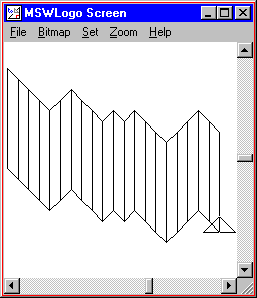
TO DOWNSLANT
  REPEAT 2 [
    FORWARD 100
    RIGHT   135
    FORWARD 15
    RIGHT   45
  ]
  RIGHT   135
  FORWARD 15
  LEFT    135
END

TO UPSLANT
  REPEAT 2 [
    FORWARD 100
    RIGHT   45
    FORWARD 15
    RIGHT   135
  ]
  RIGHT   45
  FORWARD 15
  LEFT    45
END

TO RANDOMSHEET
  REPEAT 20 [
    RUN PICK [ UPSLANT DOWNSLANT ]
  ]
END

RANDOMSHEET
|
|
TO RECTANGLE :HEIGHT :WIDTH
  REPEAT 2 [
    FORWARD :HEIGHT
    RIGHT   90
    FORWARD :WIDTH
    RIGHT   90
  ]
END

TO TRIANGLE :LENGTH
  RIGHT 45
  FORWARD :LENGTH * (SQRT 2) / 2
  RIGHT 90
  FORWARD :LENGTH * (SQRT 2) / 2
  RIGHT 135
  FORWARD :LENGTH
  RIGHT 90
END

TO HOUSE :SIZE
  ; draw the house
  RECTANGLE (10 * :SIZE) (10 * :SIZE)

  ; draw the roof
  FORWARD  10 * :SIZE
  TRIANGLE 10 * :SIZE
  BACK     10 * :SIZE

  ; draw the door
  RIGHT     90
  FORWARD   6 * :SIZE
  LEFT      180
  RECTANGLE (2 * :SIZE) (4 * :SIZE)
  BACK      4 * :SIZE
  RIGHT     90
END

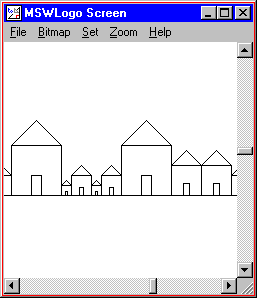
TO HOUSEROW
  REPEAT 15 [ HOUSE RANDOM 6 ]
END

HOUSEROW
|
|
TO STAR :LENGTH :POINTS
  REPEAT :POINTS [
    FORWARD :LENGTH
    RIGHT   180 - (180 / :POINTS)
  ]
END

TO TELEPORT
  PENUP
  RIGHT   RANDOM 360
  FORWARD RANDOM 1000
  PENDOWN
END

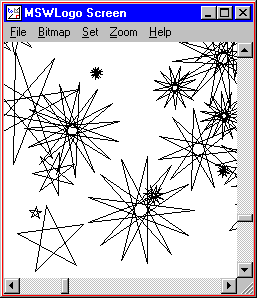
TO STARRYNIGHT
  REPEAT 30 [
    TELEPORT
    STAR (RANDOM 100 + 20) ((RANDOM 6) * 2 + 5)
  ]
END

STARRYNIGHT
|
|